
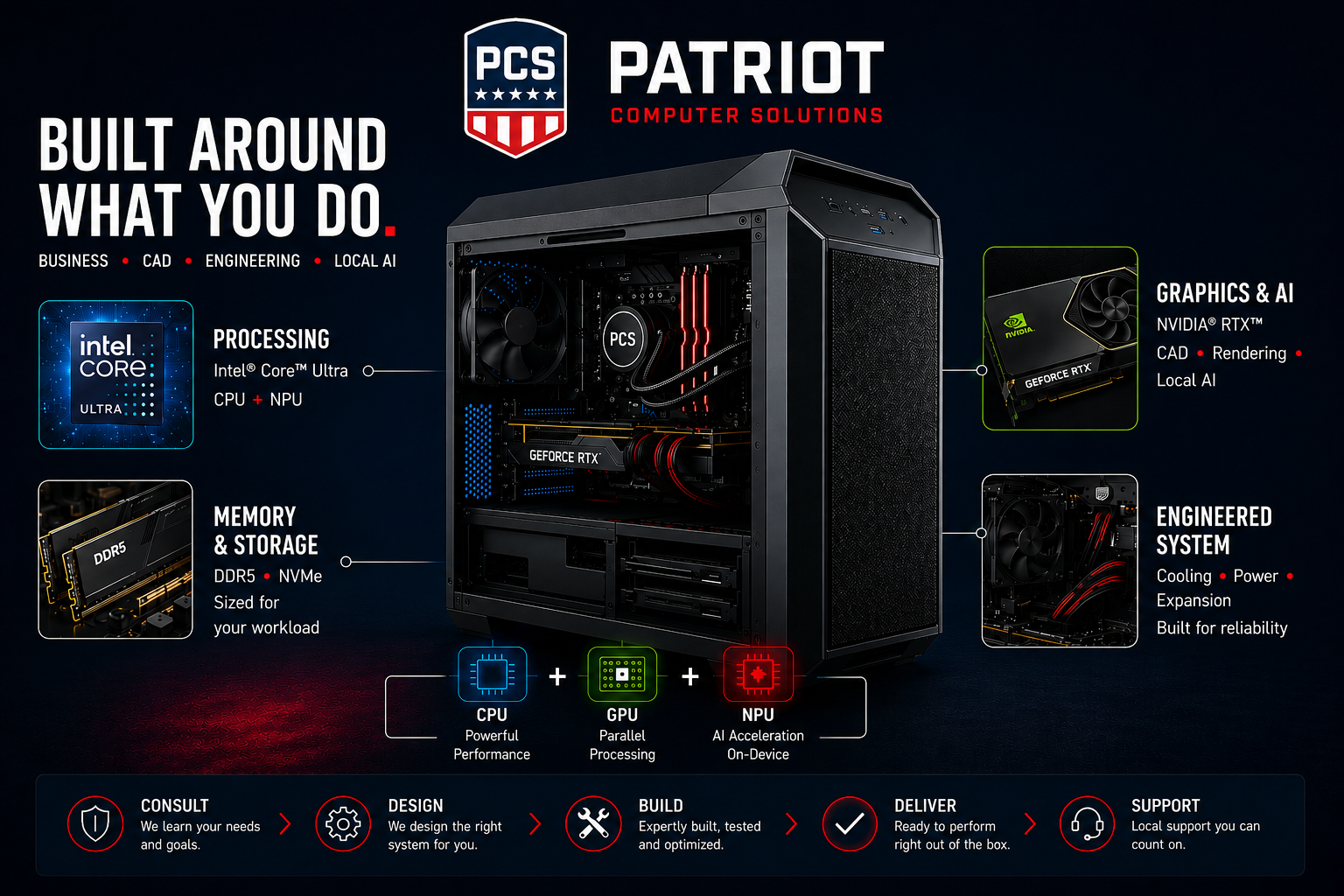
Custom Computers
Built Around What You Do
There is no single “best computer.”
The right computer depends on what you expect it to do.
Patriot Computer Solutions designs and builds computers around the applications, workload and performance requirements of the person who will actually use them.
A business workstation, engineering computer, AI workstation and everyday office PC may look similar from the outside, but what belongs inside can be very different.
One size does not fit all. Price versus performance is where the value is.
Before recommending a system, we determine what you use today, where your present computer slows you down, and what you are likely to need in the future.
The AI PC Has Changed the Computer
Modern computers can now divide work among several different types of processors.
CPU
The Central Processing Unit remains the primary general-purpose processor in the computer. Modern Intel Core Ultra processors use different types of CPU cores to handle demanding work and background processes efficiently.
GPU
The Graphics Processing Unit has evolved far beyond simply displaying pictures on a monitor. A dedicated GPU can dramatically accelerate CAD, 3D modeling, rendering, video production, engineering applications and many artificial-intelligence workloads.
NPU
The Neural Processing Unit is a newer processor designed specifically to perform artificial-intelligence operations efficiently.
Intel Core Ultra processors bring this capability directly into the PC, allowing supported AI functions to run locally without placing every task on the CPU or sending every operation to a cloud service.
The result is a computer in which the CPU, GPU and NPU can each perform the work they are best suited to handle. PCS selects the combination appropriate for your application.
Choose the Computer by the Workload
Business & Professional Systems
For accounting, Microsoft 365, web applications, communications, multitasking and everyday business use.
These systems emphasize:
- Fast application response
- Reliable components
- Adequate memory
- NVMe solid-state storage
- Quiet operation
- Security
- Future upgrade capability
The objective isn’t to install the most expensive components. It is to eliminate the components that would become bottlenecks.
AI-Ready Computers
AI is increasingly becoming part of Windows and the applications people already use.
A modern AI-ready computer can incorporate an Intel Core Ultra processor with dedicated neural-processing capability, allowing supported AI workloads to execute efficiently on the local computer.
Local processing can provide important benefits depending upon the application, including responsiveness, reduced dependence on an Internet connection and the ability to keep some processing on the computer rather than sending it to a remote service.
But simply putting an “AI” label on a computer does not make it appropriate for every AI workload.
PCS determines what AI applications you actually intend to run and selects the hardware accordingly.
CAD, Engineering & Content-Creation Workstations
CAD and engineering applications impose very different requirements from ordinary office applications.
Processor performance, graphics capability, available video memory, system memory, storage performance and even cooling can affect productivity.
PCS can design workstations for applications involving:
- SolidWorks and other 3D CAD applications
- CAM and manufacturing software
- Rendering
- Adobe and content-creation applications
- High-resolution multi-monitor environments
- Engineering and simulation workloads
- Large technical datasets
Professional NVIDIA RTX graphics can be incorporated when application requirements justify them.
Local AI Workstations
Running artificial intelligence locally can require substantially more computing power than using AI through a web browser.
For demanding local AI workloads, the graphics processor and its available memory can become as important as—or more important than—the CPU.
PCS can configure systems combining modern processors with NVIDIA GPU acceleration for workloads such as:
- Local language models
- Generative AI
- AI-assisted engineering
- Image generation
- Machine learning
- Data analysis
- AI development and experimentation
The system is designed around the intended model and workload rather than around a generic specification sheet.
The Components Still Matter
Processor
We select the processor after determining the workload rather than simply choosing the processor with the highest model number.
Different applications benefit from different combinations of single-thread performance, multiple cores, graphics acceleration and AI processing.
Memory
Insufficient RAM causes an otherwise powerful computer to wait on storage.
We size memory for the applications, files and multitasking requirements of the user, while considering future expansion.
NVMe Solid-State Storage
Modern NVMe solid-state drives provide extremely fast storage for Windows, applications and active project files. Where appropriate, separate drives can be used for operating systems, project data, scratch space, backups or high-volume workloads.
Graphics
Integrated graphics may be entirely adequate for a business computer.
CAD, rendering, engineering and serious AI workloads can require dedicated graphics processors with substantial processing power and dedicated video memory. Installing an expensive GPU where it provides no benefit wastes money. Installing an inadequate GPU in a workstation wastes time every day.
Motherboard
The motherboard determines much of the computer’s future.
Expansion slots, memory capacity, storage interfaces, networking, USB and Thunderbolt capability, power delivery and future upgrade choices all depend upon the platform selected at the beginning. We don’t select the motherboard as an afterthought.
Cooling & Power
High-performance components cannot deliver sustained performance without adequate power and cooling. PCS designs these systems as complete machines rather than as collections of individually impressive parts.
Price Versus Performance
The most expensive computer is not necessarily the best computer.
Our objective is to place your money where it produces a measurable benefit.
We can often spend less on components that have little effect on your workload and apply that budget to the processor, memory, storage or graphics hardware that actually determines how quickly your work gets done.
That is the advantage of a custom computer.
Built for Today. Designed for Tomorrow.
Technology continues to change rapidly, particularly as artificial intelligence becomes integrated into operating systems and professional applications.
A PCS custom computer is built for what you need now while preserving sensible opportunities for future expansion.
Whether you need a dependable business computer, a CAD workstation, an AI-ready PC or a high-performance local AI workstation, we start with the same question:
What do you need the computer to accomplish?
Then we build the machine around the answer.
Call Patriot Computer Solutions at 916-791-7076 to discuss your requirements.